Get sharp, scannable barcodes
Before you start
- A design with a barcode or QR code. See Add a barcode.
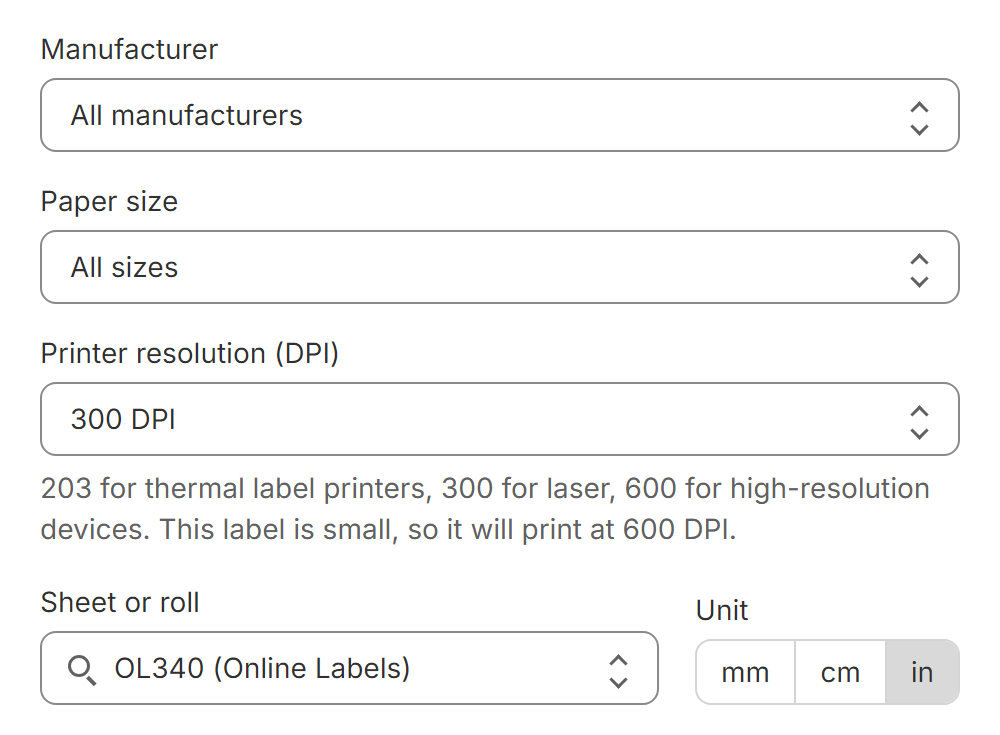
Choose the DPI for your printer
Label Wizard prints each label as an image at the DPI you choose, so the DPI sets how sharp the bars and digits are. A label at 300 DPI holds about half as many dots again as at 203 DPI.
- 203 DPI: thermal label printers.
- 300 DPI: laser printers.
- 600 DPI: high-resolution devices.
Choose it in Printer resolution (DPI) each time you print, or set Default printer DPI in Settings. See Change your app settings.
At 300 DPI, small labels move up by themselves: the picker says "This label is small, so it will print at 600 DPI." At 203 DPI they stay at 203.
Give the barcode room
- Make it as wide as the label allows. On a 1.00 x 0.50 in label, a barcode stretched across the label decoded at 203 and 600 DPI; one left at a third of the width did not.
- Fill the label with a QR code. A QR code that filled the height of a 1.00 x 0.50 in label decoded; a small one on the same label did not.
- Keep clear space on both sides of the bars, and dark bars on a light background.
- Check the digits under small barcodes. On a 0.75 x 0.375 in label the bars decoded at 203 DPI, but the digits were readable only at 600 DPI.
These results come from decoding test PDFs with barcode software. A phone or scanner can behave differently, so test your own.
Test before a large run
- Print one label, or one sheet on plain paper.
- Scan it with the scanner or phone you use at the till or in the stockroom.
- If it does not scan, make the barcode wider or raise the DPI, then print again.
If something goes wrong
- The bars look fuzzy: raise the DPI to match your printer. Thermal printers stay at 203.
- The digits are too small to read: raise Font size in the barcode's Style, or print at 600 DPI.
- The labels are shifted on the sheet: see Fix common printing problems.
Related articles
Updated on: 05/11/2026
Thank you!